What Makes WordPress Web Design Effective for Austin Businesses?
WordPress is a flexible website platform that allows businesses to publish content, manage service pages, integrate marketing tools, and expand their websites as their needs change.
For Austin businesses, professional WordPress website design can support several business goals:
- Brand credibility: Present your services, experience, and customer reviews professionally.
- Local visibility: Organize service information to help search engines understand your business.
- Lead generation: Guide visitors toward calls, consultation requests, and contact forms.
- Content marketing: Publish useful articles that answer customer questions.
- Scalability: Add landing pages, integrations, and new services as your business grows.
The key is to design the website around your customers’ needs rather than choosing a layout simply because it looks appealing.
For example, an Austin roofing company may need dedicated roofing service pages, project photos, estimate-request forms, and prominent phone numbers. A B2B technology company may benefit more from solution pages, case studies, and consultation booking forms.
The right design depends on what your customers need to know before contacting you.
What Should a Lead-Generating WordPress Website Include?
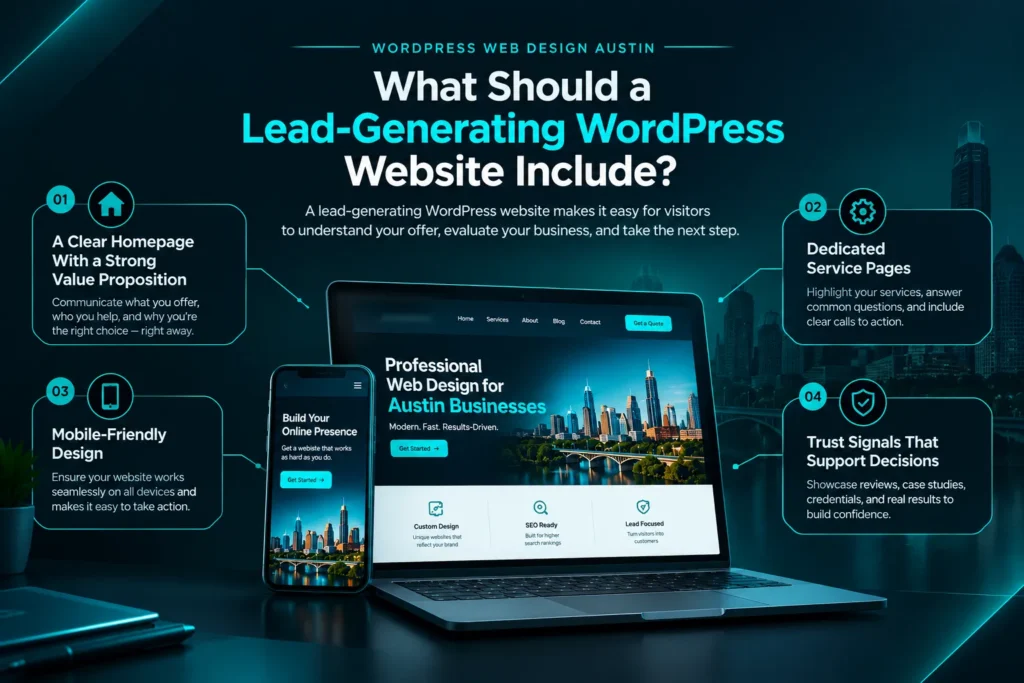
A lead-generating WordPress website makes it easy for visitors to understand your offer, evaluate your business, and take the next step.
1. A Clear Homepage With a Strong Value Proposition
Your homepage should communicate three things quickly: what you offer, who you help, and why customers should consider your business.
Use a specific headline rather than a vague statement about providing excellent service. Follow it with a short explanation of your value and a visible call to action.
For example, an Austin marketing agency might use a headline focused on helping local businesses generate qualified leads through marketing and automation.
Place the main CTA, such as Book a Consultation or Request a Quote, where visitors can easily find it.
2. Dedicated Service Pages
Create a separate page for each important service instead of trying to explain everything on one page.
A dedicated service page should include:
- A clear description of the service.
- The problems it solves.
- Key benefits and relevant features.
- Answers to common customer questions.
- Genuine testimonials or supporting evidence where available.
- A relevant contact or booking CTA.
Dedicated pages help visitors find information that matches their needs and give search engines a clearer understanding of your website’s structure.
3. Mobile-Friendly Design
Your website should work smoothly on smartphones, tablets, and desktop computers.
Make text readable, keep buttons easy to tap, avoid horizontal scrolling, and ensure forms are simple to complete on smaller screens.
For service businesses, mobile usability is particularly important because visitors may want to call a company or request an estimate immediately.
Test important pages on actual mobile devices before launching your website.
4. Trust Signals That Support Decisions
Visitors are more likely to consider contacting a business when they can evaluate its credibility.
Useful trust signals include genuine customer reviews, relevant project examples, clear business information, professional team profiles, and transparent service descriptions.
If your business serves Austin and surrounding communities, explain your actual service area. Avoid creating unsupported claims about your experience, customer results, or local presence.
How Should You Structure a WordPress Website to Generate More Leads?
Your website structure should help visitors move naturally from discovering your business to understanding your services and making an inquiry.
| Website Page | Primary Purpose | Recommended Conversion Element |
| Homepage | Explain your offer and guide visitors | Primary CTA |
| Service pages | Explain individual services | Quote or consultation form |
| About page | Build credibility | Contact or consultation CTA |
| Case studies or portfolio | Demonstrate relevant experience | Project inquiry CTA |
| Blog | Answer questions and attract organic visitors | Relevant contextual CTA |
| Contact page | Make contacting your business easy | Form, phone number, and business details |
Keep navigation straightforward and use descriptive page titles and URLs. Important service pages should be accessible through logical navigation and relevant internal links.
Avoid adding unnecessary pages just to increase website size. Every page should serve a customer need or a clear business purpose.
How Can Local SEO Help an Austin WordPress Website Attract Customers?
Local SEO helps businesses improve their visibility for relevant searches associated with their services and locations.
A well-designed WordPress website provides a foundation for local SEO, but design alone cannot guarantee rankings.
Start with these practices:
Optimize page titles and headings. Include the primary service and location when relevant. For example, a page targeting WordPress web design in Austin should clearly communicate that service without repeating the location unnaturally.
Create useful service-area content. Explain which communities you serve and what customers can expect. Each location page should provide genuinely useful information rather than repeating nearly identical content with different city names.
Use descriptive URLs. Short, readable URLs help visitors and search engines understand page topics.
Build relevant internal links. Connect related blog posts, service pages, and supporting resources using descriptive anchor text.
Optimize images. Use appropriately sized images, descriptive filenames, and meaningful alt text when an image conveys information.
Maintain a crawlable website. Check indexing settings, XML sitemaps, canonical URLs, and redirects where applicable.
If your business qualifies for a Google Business Profile, keep its information accurate and consistent with your real-world business details. A website and business profile can support your local presence, but neither guarantees placement in local search results.
How Can You Connect WordPress to CRM and Lead Follow-Up Systems?
A website can generate inquiries, but those inquiries still need to reach the right people and receive timely follow-up.
Connecting WordPress with a customer relationship management (CRM) system can help businesses organize incoming leads and manage the next steps.
A typical workflow looks like this:
- A potential customer visits a service page.
- They complete a contact form or request an appointment.
- Their information is sent to the connected CRM.
- The system sends an appropriate confirmation or alerts the relevant team member.
- The business follows up with the prospect.
- The team tracks the inquiry through the sales process.
Depending on the tools and configuration, businesses can also introduce appointment scheduling, lead notifications, and automated follow-up sequences.
For example, a local contractor could use a WordPress estimate-request form connected to a CRM to organize inquiries by service type and location.
At AICOADS, this creates an opportunity to connect website design with broader CRM automation and lead-generation services. The objective is to build a website that supports the complete customer journey rather than treating the contact form as the end of the process.
Ensure that forms collect only necessary information and that your data handling and follow-up practices comply with applicable privacy requirements.
How Much Does WordPress Web Design Cost in Austin?
The cost of WordPress web design in Austin depends on the website’s complexity, functionality, content requirements, and ongoing support needs.
A simple informational website generally requires a different investment from a custom website with multiple service pages, advanced integrations, or ecommerce functionality.
Important pricing factors include:
- Number of pages: More pages generally require additional planning, design, and content work.
- Design requirements: Custom layouts and specialized functionality can increase project complexity.
- Content creation: Copywriting, photography, and content migration may affect the overall budget.
- SEO requirements: Technical setup, metadata, redirects, and content optimization may be included in the project scope.
- Integrations: CRM connections, booking systems, and marketing automation require additional configuration.
- Maintenance: Hosting, backups, updates, security, and ongoing improvements may involve recurring costs.
Before hiring a WordPress web design company in Austin, ask for a clear breakdown of deliverables, project timelines, ongoing expenses, and ownership arrangements.
Compare proposals based on what they include and how well they address your business goals, not price alone.
How Do You Choose the Right WordPress Web Design Company in Austin?
Choosing a WordPress web design company requires more than comparing portfolios. You should evaluate whether the agency understands your customers, business objectives, and long-term website requirements.
Use this checklist when comparing providers:
- Review relevant projects: Look for websites serving similar audiences or business models.
- Ask about conversion strategy: Find out how the agency plans page layouts, CTAs, and lead capture.
- Check mobile usability: Confirm that the proposed website will work across screen sizes.
- Discuss SEO requirements: Clarify what technical and on-page SEO work is included.
- Understand ownership: Ask who controls your domain, website files, hosting, and accounts.
- Confirm tracking: Determine how form submissions, calls, and other important conversions will be measured.
- Clarify maintenance: Understand how updates, backups, security, and support will be handled.
The best provider is one whose approach aligns with your goals, budget, and internal capabilities.
For businesses that want design, lead generation, and automation to work together, AICOADS’ custom website design and development services are a relevant option to explore.
What Should You Check Before Launching a WordPress Website?
Before publishing your website, verify that its essential pages, functionality, and technical settings work correctly.
Use this checklist:
- Test navigation, forms, and CTA buttons.
- Check layouts on mobile devices and desktop screens.
- Confirm that phone numbers and contact details are correct.
- Review page titles, meta descriptions, headings, and image alt text.
- Test form submissions and CRM integrations.
- Verify analytics and conversion tracking.
- Check indexing settings and XML sitemap availability.
- Set up appropriate backups, security measures, and software updates.
- Test redirects if existing URLs have changed.
- Remove placeholder text and broken links.
After launch, monitor website performance and lead quality. Use real visitor behavior and conversion data to identify which pages need improvement.
Frequently Asked Questions
How much does WordPress web design cost in Austin?
WordPress website costs vary based on page count, design complexity, content, integrations, SEO requirements, and maintenance. Request a detailed proposal that separates initial development costs from ongoing expenses.
Is WordPress a good choice for small businesses?
Yes. WordPress can be a practical option for small businesses that need service pages, a blog, contact forms, and room to expand. The right setup depends on the business’s functionality, budget, and maintenance requirements.
How long does it take to build a WordPress website?
The timeline depends on the scope, number of pages, design requirements, content readiness, integrations, and approval process. A straightforward website typically requires less work than a complex custom project.
Can a WordPress website generate leads without paid advertising?
Yes. A WordPress website can attract organic visitors through useful content and SEO, then convert relevant visitors through service pages, contact forms, and clear CTAs. Results depend on search visibility, demand, competition, and the effectiveness of the website.
What should I look for in a WordPress web design company in Austin?
Look for relevant experience, a clear project scope, mobile-friendly development, SEO knowledge, conversion-focused design, transparent ownership arrangements, and reliable post-launch support.
Build a WordPress Website That Supports Business Growth
A successful business website needs more than an attractive layout. It should communicate your value, make your services easy to understand, support local search visibility, and provide a straightforward path for potential customers to contact you.
For Austin businesses, combining WordPress web design with conversion optimization, technical SEO, and effective lead follow-up can create a stronger foundation for sustainable growth.